Integrating LL Textur into Design Workflows: A Practical Guide to Vintage Typography
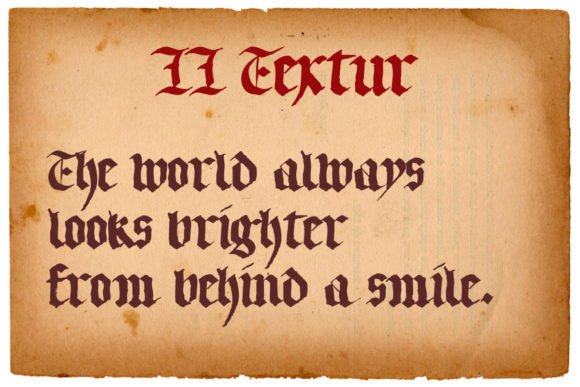
In the landscape of digital design, typography is rarely just about readability; it is a primary vehicle for tone, atmosphere, and brand identity. Among the vast array of typefaces available, LL Textur occupies a distinct niche. It is a gorgeous Blackletter styled font that brings an authentic and vintage touch to any visual composition. For professionals, creators, and entrepreneurs looking to establish a classical vibe in their projects, understanding how to implement this specific typeface effectively is crucial.
This article explores the practical application of LL Textur within modern workflows. We will move beyond simple aesthetic appreciation to discuss how this font interacts with other design assets, how it fits into planning and execution phases, and how to maintain consistency when using such a distinctive style in commercial or personal projects.
Understanding the Role of Blackletter in Modern Contexts
Blackletter, historically associated with medieval manuscripts and early printing presses, carries significant weight in visual communication. When you select LL Textur, you are not merely choosing a font; you are invoking a sense of history, authority, and tradition. However, integrating this heavy stylistic element into contemporary digital or print media requires careful consideration.
The challenge lies in balancing the ornate nature of Blackletter with the clean, minimalist trends prevalent in current user interface (UI) and user experience (UX) design. LL Textur serves as a display font, meaning its primary function is to grab attention rather than facilitate long-form reading. Recognizing this distinction is the first step in a successful implementation process. If used incorrectly—such as for body text—it can create friction for the user, leading to poor engagement and a perception of low quality.
Defining the Use Case Before Implementation
Before opening your design software, it is essential to define where LL Textur fits into your broader project goals. Is this for a logo? A book cover? A wedding invitation? A menu for a gastropub? The context dictates the scale, color, and pairing strategy.
- Branding: For small businesses aiming for a heritage look, LL Textur can serve as the cornerstone of a logo system, provided it is paired with simpler sans-serif fonts for secondary information.
- Editorial Design: In publishing, this font excels in chapter headers, pull quotes, or section dividers, adding a layer of sophistication without overwhelming the narrative flow.
- Event Marketing: For weddings, galas, or theatrical productions, the authentic vintage touch of LL Textur aligns perfectly with themes of elegance and timelessness.
Preparation and Asset Management
A smooth workflow begins with proper preparation. Once you have decided that LL Textur is the right tool for the job, the next phase involves acquiring and organizing the necessary assets. This includes not only the font files themselves but also the supporting elements that will complement the Blackletter style.
Font Licensing and Compatibility
For freelancers and agency owners, legal compliance is part of the professional standard. Ensure that the license for LL Textur covers your intended use case, whether that is web embedding, print distribution, or merchandise. Different tiers of licenses may apply to different scales of production. Neglecting this step can lead to costly legal issues later in the project lifecycle.
Furthermore, verify the technical compatibility of the font files. Most modern design platforms support OpenType formats, which offer advanced features like ligatures and alternate glyphs. These features are particularly relevant for Blackletter fonts, as they allow for more natural-looking letter connections and historical accuracy. Check if LL Textur includes these alternates, as utilizing them can significantly enhance the authenticity of the final output.
Building a Complementary Style Guide
LL Textur is visually dominant. To prevent visual clutter, you must plan how it will interact with other typographic elements. A common mistake is allowing the Blackletter font to compete with equally ornate decorative elements. Instead, adopt a strategy of contrast.
Create a mini-style guide before beginning the main design work. Define the following parameters:
- Primary Typeface: LL Textur for headlines and key identifiers.
- Secondary Typeface: A clean, highly legible sans-serif or humanist serif for body copy and metadata. This ensures that while the "vibe" is classical, the information remains accessible.
- Tertiary Elements: Rules, lines, or subtle geometric shapes that bridge the gap between the complex curves of the Blackletter and the simplicity of the supporting text.
Execution: Integrating LL Textur into Creative Processes
During the active design phase, the integration of LL Textur requires precision. Because the characters are intricate, spacing (kerning and tracking) becomes a critical component of quality control. Poor spacing can cause the letters to bleed into one another, destroying the legibility and the elegant aesthetic that makes the font attractive.
Kerning and Spacing Adjustments
Automated kerning tables in design software often struggle with Blackletter fonts due to the complexity of the character shapes. Manual adjustment is frequently necessary. Pay close attention to the negative space between ascenders and descenders, as well as the loops in letters like 'g', 'a', and 'e'.
When setting large display sizes, you may need to increase tracking (the overall spacing of the text) slightly to allow the eye to rest. Conversely, when using smaller sizes, ensure that the stroke widths do not become so thin that they break apart on screen or in low-resolution prints. Testing at actual size is a non-negotiable step in this workflow.
Color and Texture Pairing
The vintage aesthetic of LL Textur is enhanced by appropriate color choices. Consider using deep, rich tones such as burgundy, forest green, navy blue, or charcoal gray against cream or off-white backgrounds. Avoid neon colors or overly saturated primaries, which can clash with the historical gravity of the typeface.
If you are working in print, consider texture. Embossing, foil stamping, or letterpress techniques can add physical depth to LL Textur, reinforcing the tactile nature of traditional printing. In digital contexts, subtle drop shadows or textured overlays can mimic this effect, though care must be taken to maintain accessibility standards regarding contrast ratios.
Workflow Efficiency and Quality Control
For professionals managing multiple projects, efficiency is key. Developing a template or preset system for LL Textur can streamline future tasks. Save variations of headline styles, button labels, and social media graphics that utilize this font. This reduces the cognitive load during subsequent projects and ensures brand consistency across different campaigns.
Consistency Across Platforms
One of the challenges of using specialized display fonts is maintaining consistency across various media. A logo designed in vector format may look crisp, but its rasterized version for social media avatars might lose detail. Plan for scalability from the outset.
Create simplified versions of logos or icons that incorporate LL Textur for contexts where the full detail cannot be rendered. This might involve reducing the number of flourishes or simplifying the ligatures. Document these variations in your brand guidelines so that all team members or collaborators understand the hierarchy of usage.
Feedback Loops and Iteration
Do not rely solely on your own judgment. Share drafts with stakeholders or target audience representatives, particularly focusing on legibility and emotional impact. Ask specific questions: Does the font feel too aggressive? Is it difficult to read? Does it convey the intended "classical vibe" or does it feel gimmicky?
Use this feedback to refine the implementation. Perhaps the font needs to be paired with a heavier weight of the secondary typeface to ground it. Maybe the color contrast needs adjustment. Iteration is a vital part of the process, ensuring that the final product meets both aesthetic and functional requirements.
Long-Term Value and Adaptability
While trends in design change rapidly, certain classic styles endure. LL Textur offers longevity because it taps into timeless associations with craftsmanship and history. However, even classic fonts require adaptation to remain relevant. Stay informed about evolving design standards, particularly regarding accessibility and mobile-first design.
As web technologies advance, tools like CSS @font-face and variable fonts may offer new ways to implement Blackletter styles more efficiently. Keep an eye on these developments, as they may provide better performance or flexibility for projects requiring LL Textur. Additionally, consider how the font might be used in emerging mediums, such as augmented reality (AR) experiences or interactive installations, where its three-dimensional potential could be fully realized.
Conclusion
Integrating LL Textur into your design workflow is more than a stylistic choice; it is a strategic decision that impacts branding, communication, and user experience. By understanding its strengths as a display font, preparing complementary assets, and adhering to rigorous quality control measures, you can harness its authentic vintage touch to create compelling, professional results. Whether you are a freelancer crafting a brand identity or an educator designing course materials, LL Textur provides a powerful tool for adding depth and character to your work. Approach its implementation with planning and precision, and it will serve as a reliable asset in your creative arsenal for years to come.